
Can photo timestamps be faked?
Yes. Most of them, easily, with free software and no particular skill. That is worth knowing before you build a record on top of one, because the useful question is not whether a timestamp can be faked but what a particular timestamp would take to fake, and whether anyone could tell.
· 7 min read
An EXIF date takes about ten seconds to change
The capture date your camera writes into a photo lives in the EXIF block, and EXIF is a set of editable fields in the file. Free tools rewrite them in bulk. Nothing about the format resists it, because it was never designed to: EXIF exists so software can sort your holiday photos, not so a date can survive a motivated adversary.
This is why a bare EXIF date carries very little weight on its own. It is evidence that a file says something, not evidence that the something is true. Anyone who has been shown a screenshot of a file listing as proof of when work happened has already met the limits of this.
A stamp in the pixels raises the cost, without settling it
Burning the date into the image is a real improvement, and for an ordinary dispute it is usually enough. The date is no longer a field to edit; it is part of the picture. Removing it means retouching the photo, and doing that convincingly over a detailed background is more work than most people arguing about an invoice will do.
But raising the cost is not the same as making it impossible, and it is worth being blunt about that. Someone determined, with an image editor and some patience, can alter a stamp. A stamp is a strong claim rather than a proof.
There is a second limit that matters more in practice, because it needs no adversary at all. The stamp records what the device believed at the time. Timestamp It draws the date from the phone's clock at the moment of capture, so a phone with the wrong clock produces a photo with the wrong stamp, honestly and without anyone intending it.
A fingerprint does not care what the clock said
This is where the question changes shape. Instead of asking whether the date on the picture is true, ask a narrower question that has a checkable answer: did this exact file exist by a certain point in time, and has it changed since?
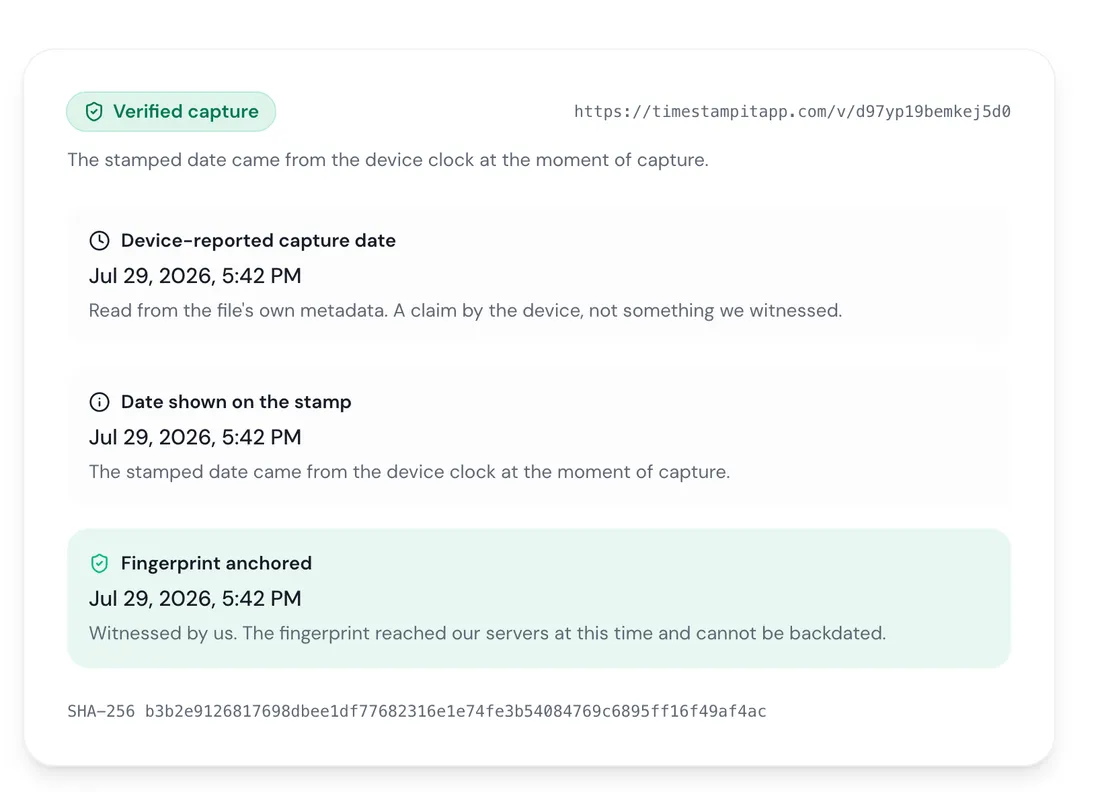
Timestamp It records a SHA-256 fingerprint of each file. A fingerprint is a short value derived from every byte of the image; change one pixel and the value changes completely, and there is no practical way to work backwards from a fingerprint to a file that produces it. When that fingerprint reaches the server it is recorded with a server-witnessed time — a time that does not come from your phone, and that you cannot set.
So even if the stamp on the picture is disputed, the fingerprint establishes something independent of it: a file with exactly these bytes existed by this date, and the copy in front of you is still that file. Anyone can check it by selecting the file on the verification page. The hashing runs in the browser and the image is never uploaded, so the other side can verify your photo without you sending it to them, and without trusting our servers with it.
Where the date came from is disclosed, not glossed
Timestamp It lets you set a stamp date by hand, and lets you stamp an imported photo using the date already in its metadata. Both are legitimate — cataloguing a backlog is a real need — and both mean the printed date did not come from a live capture.
Rather than quietly treating those the same, a verification result says which one it was. A date taken from the device at capture is labeled a verified capture. A date read from an imported photo's own metadata is labeled a device-reported date. A date typed in by a person is labeled exactly that. Where the record is too old to say, it says the source is not recorded rather than guessing.
That distinction is the point. The verified label means something precisely because the other labels are shown honestly; a system that called all four the same thing would be worth nothing, and anyone checking would be right to ignore it.
What none of this catches
No stamping app, this one included, can tell you that a photograph is honest. It can only tell you things about the file.
Photograph a screen showing an old picture and you get a genuine capture, correctly stamped, of a fake subject. Stamp an imported photo whose EXIF was already wrong and the stamp faithfully reproduces the wrong date — correctly labeled as device-reported, and still wrong. Photograph the right thing at the wrong address, or the wrong thing at the right one, and every technical signal agrees with you.
This is not a gap peculiar to timestamps. A photograph has never established more than that light hit a sensor in a particular arrangement. What the record adds is that the file has not changed since a known date, which is a narrower claim and the only one worth making.
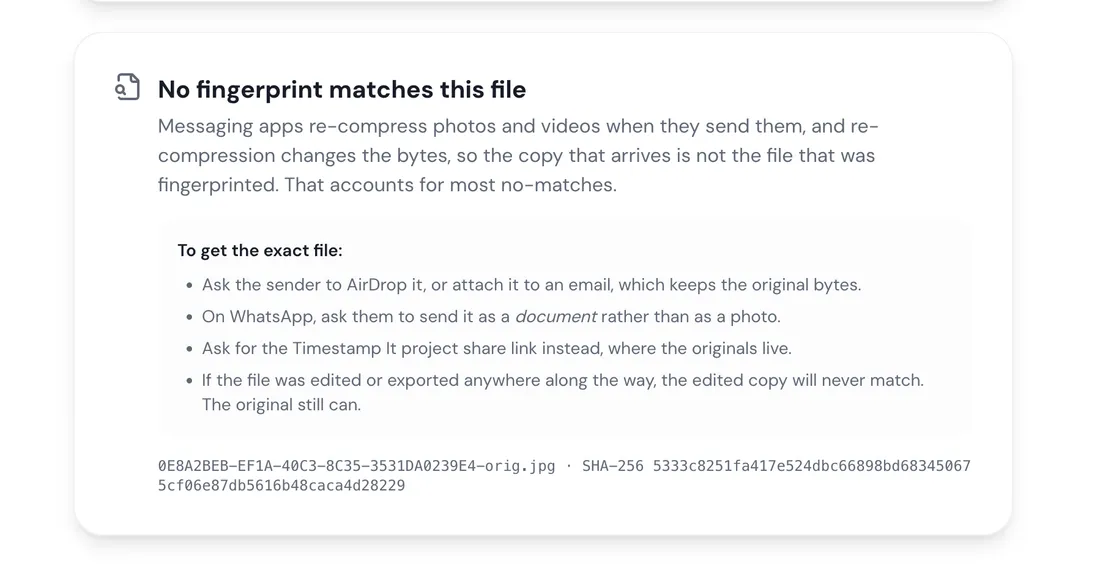
There is a mirror-image trap worth knowing about too: a failed check is not evidence of forgery. Most no-matches are innocent. Messaging apps re-compress photos when they send them, and re-compression changes the bytes, so the copy that arrives is genuinely not the file that was fingerprinted — the same mechanism that strips the capture date out of a photo you send to a client. The original still verifies. The forwarded copy never will, and treating that as a red flag would be a mistake in the other direction.
What holds up in practice
Disputes are rarely settled by one perfect photo. They are settled by a body of evidence that is boring and consistent: photographs taken as a matter of routine across a whole job, at the start and not only when something went wrong, with the original files kept rather than screenshots of them.
That pattern is hard to fabricate after the fact, and it is the thing a stamp and a fingerprint make legible. A single photo produced the week a claim is filed invites the obvious question. Four hundred photos captured over three months, each fingerprinted on the day it was taken, does not.
Whether any of it is admissible is a separate question with a jurisdiction-specific answer, and nothing here is legal advice. But admissibility is downstream of credibility, and credibility is built by habit rather than by any single feature.
Frequently asked
Check a photo against its fingerprint
Select any file on the verification page and see whether it still matches what was recorded. The hashing happens in your browser — the photo never leaves your device.