
GPS location stamp
Exact coordinates are embedded on every photo, so there is no argument about where the job was completed.
GigStamper is our app for gig workers. It is the same timestamp-and-location stamping idea behind Timestamp It, stripped down to one job: capturing proof that a delivery, ride, or task actually happened, fast enough to use mid-shift.
Free to download. iPhone only for now.
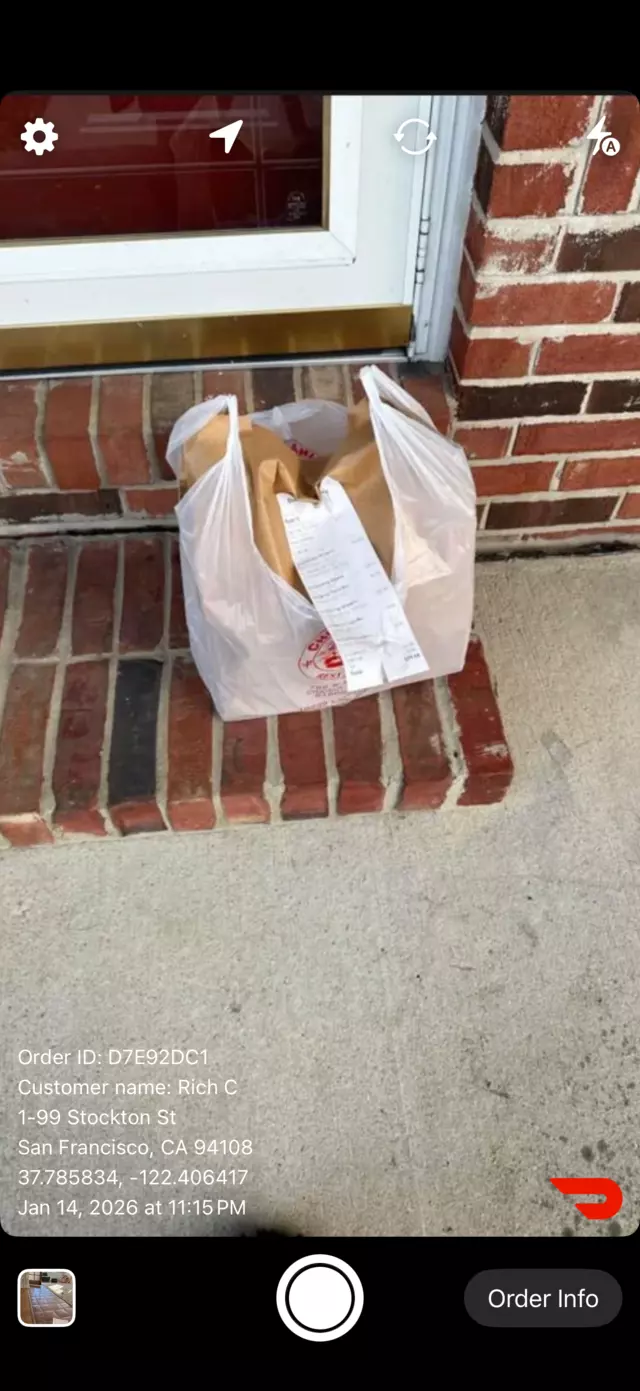
Gig work runs on other people's records. A false claim, a missing-item report, or a disputed drop-off lands on the worker, and a plain photo rarely settles it because it carries no proof of when or where it was taken. GigStamper puts that evidence into the picture at the moment of capture.
Everything is tuned for speed, because the photo has to happen between one stop and the next.
Exact coordinates are embedded on every photo, so there is no argument about where the job was completed.
Date and time are synced with official servers rather than the phone clock, so the record holds up later.
Photos back up and sync automatically, so a lost or replaced phone does not take the proof with it.
Parking garages, basements, rural routes. Stamp offline and everything syncs once you have signal again.
Uploads are encrypted in transit, and the photos stay yours. No ads and no resale of your activity.
Open, tap, done. Built for people who are being timed and cannot stop to fill out a form.
Document pickups and drop-offs
Prove delivery completion
Track every handoff
Before and after proof
Document substitutions
Timestamped reports
Launch GigStamper and photograph the completed drop-off, job site, or finished work.
GPS coordinates and the timestamp are burned into the image itself, visible right on the photo.
The photo is stored on the device and backed up to the cloud, so you can pull it up whenever it is questioned.
Both stamp the time, date, and location onto a photo. They differ in what happens to the photo afterwards.
For one person protecting their own record. Capture is the whole workflow: snap the proof, keep it backed up, pull it up if a claim comes in.
Best for drivers, shoppers, couriers, and solo taskers.
For work that has to be handed to someone else. Photos group into projects you can batch-stamp, share by link, hand to a client as a PDF, and collaborate on with a team.
Best for crews, inspectors, contractors, and property teams.

Free to download, no account required, and it works without a signal.